Tired of that sinking feeling when a warning light pops up on your dash? It's time to take control. Let's dive into how vehicle diagnostic apps can turn you into an informed car owner.
There’s a universal moment of dread every car owner knows. You’re driving along, maybe humming to the radio, when a small, ominous orange light flickers to life on your dashboard: the check engine light. For most of us, this triggers a familiar sequence of emotions: confusion, then anxiety, and finally, the frustrating sense of being powerless. It usually means a trip to the mechanic, where you're left hoping the problem is minor and the bill won't require a second mortgage.
But what if it didn’t have to be that way? Honestly, I used to think understanding car trouble was a language I’d never speak. The inner workings of an engine felt like a total mystery, and the check engine light was its most cryptic symbol. That all changed when I discovered the world of vehicle diagnostic apps. It sounds incredibly technical, but it’s one of the most empowering shifts in modern car ownership. Suddenly, you can have a conversation with your car and actually understand its response.
These tools have moved from the expensive, clunky devices of a professional garage to sleek, affordable gadgets that pair with the smartphone in your pocket. It’s not about replacing your trusted mechanic, but about transforming your role from a worried passenger to an informed co-pilot in your car's health journey. It’s about saving money, yes, but more importantly, it’s about trading anxiety for confidence.
How Do These Magic Apps Work?
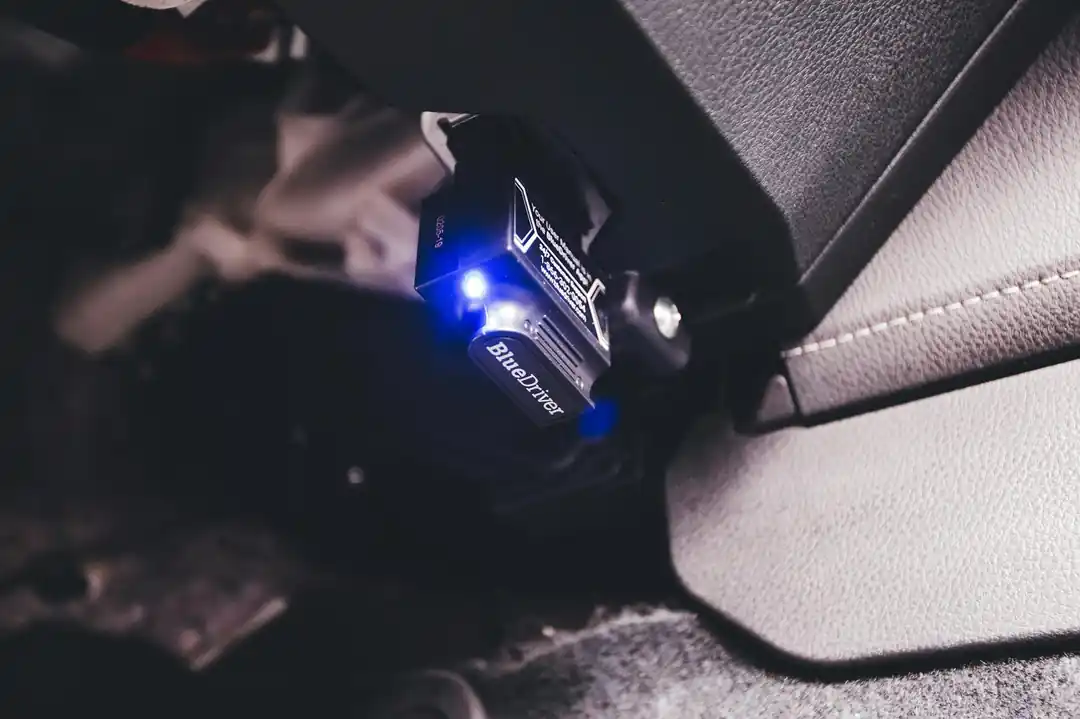
Before you can use an app, you need to understand the little piece of hardware that makes it all possible: the OBD-II scanner. "OBD" stands for On-Board Diagnostics, and "II" is for the second generation of this system, which has been a mandatory feature in every car sold in the United States since 1996. Think of it as a universal language that all modern cars speak. Your car is constantly monitoring its own systems—from the engine and transmission to the fuel and emissions systems. When it detects a problem, it generates a specific Diagnostic Trouble Code (DTC) and stores it in its computer.
This is where the scanner comes in. It’s a small adapter that you plug into your car’s OBD-II port. You’ve probably never noticed this port, but it’s there, usually located under the dashboard on the driver’s side. Once plugged in, the scanner acts as a bridge between your car's computer and your smartphone. Using Bluetooth or Wi-Fi, it sends all that juicy data—the error codes and a stream of live performance metrics—directly to a diagnostic app on your phone.
The app is the translator. It takes the cryptic codes (like "P0420" or "P0171") and turns them into plain English, telling you, for example, that your catalytic converter efficiency is below threshold or that the system is running too lean. It’s a beautifully simple and effective system that demystifies the most common car problems.
Getting Started: Your Simple Two-Part Toolkit
Ready to give it a try? You only need two things to get started on your journey to becoming a more informed car owner. The first is the OBD-II scanner adapter itself. You can find these online from dozens of brands at a wide range of price points, from super affordable basic models to more advanced units. For most people, a reliable Bluetooth scanner that's compatible with both iOS and Android is the perfect starting point. Brands like BlueDriver, FIXD, and BAFX Products are popular in the US for their reliability and ease of use.
The second piece of the puzzle is the app. Many scanners come with their own dedicated, free app, which is often the best place to start. The BlueDriver and FIXD apps, for instance, are designed to work seamlessly with their own hardware and are known for being incredibly user-friendly. They not only read the codes but also provide detailed reports, explain the severity of the issue, and even suggest potential fixes.
If you want to explore further, there are also fantastic third-party apps like Torque (a long-time favorite for Android users) or Car Scanner ELM OBD2 (available on both platforms). These apps often offer more customization, allowing you to build a dashboard of real-time gauges to monitor everything from your engine's temperature to your fuel economy as you drive. Just be sure the app you choose is compatible with the scanner you buy.
More Than Just a Code: What You Can Really Do
The most immediate benefit, of course, is understanding that check engine light. The app will tell you the code, what it means, and often, how serious it is. Is it a loose gas cap (a surprisingly common culprit), or is it something more urgent that requires an immediate trip to the shop? This knowledge alone is a massive stress-reducer. You can even clear the code yourself after you've fixed the issue (or tightened the gas cap).
But these apps go so much further. Many provide a stream of live data. You can watch your engine's RPM, vehicle speed, coolant temperature, and fuel trim in real-time. This is incredibly useful for diagnosing intermittent problems that don't always trigger a light. It also helps you understand your car's normal operating state, so you can spot when something is starting to go wrong before it becomes a major failure.
Ultimately, this information saves you money. First, you avoid unnecessary diagnostic fees at the mechanic, since you've already done the initial work. Second, you can have a much more intelligent conversation with your service advisor. Instead of saying, "There's a weird noise," you can say, "I'm getting a P0301 code, which indicates a cylinder 1 misfire." This helps the mechanic pinpoint the problem faster and protects you from being sold services you don't need. It’s about leveling the playing field.
A Word of Caution
As empowering as these tools are, it’s important to know their limits. A diagnostic app is a fantastic source of information, but it is not a replacement for the experience and expertise of a certified mechanic. The app can tell you what system is reporting a fault, but it can't always tell you why. For example, an oxygen sensor code might mean the sensor has failed, or it could mean there's a vacuum leak or a fuel delivery problem causing the sensor to give a bad reading.
Think of your diagnostic app as a very smart first opinion. It helps you triage the situation and gather crucial intelligence. For simple fixes that you're comfortable with—like replacing an air filter or, yes, tightening the gas cap—it can guide you through the whole process. For anything more complex, especially issues involving safety systems like brakes or airbags, use the information to find a good mechanic and then let them do their job.
The goal isn't to do every repair yourself. The goal is to never again feel helpless when a warning light comes on. It's about understanding your vehicle, making informed decisions, and approaching car maintenance with confidence instead of fear. And that's a feeling every driver deserves.
The Digital Cockpit: Navigating the Best In-Car Infotainment Systems
Your Car Gets Better With Age: The Magic of Over-the-Air Updates
Related Posts
 MOBILE
The Great Console Debate: How to Choose the Right Gaming System for Your Family
Feeling stuck between a Switch, a PlayStation, and an Xbox? Let's break down which gaming console is the perfect fit for your family's game nights.
 MOBILE
From Fragile to Formidable: The Surprising Evolution of Foldable Phone Durability
Remember when the idea of folding a smartphone screen in half felt like a disaster waiting to happen? Let's talk about how far they've come, because the story is pretty incredible.

Popular Posts

Rethinking Non-Profit Promotion: Creative Strategies That Actually Drive Event Impact

How to Actually Master a New Language on Your Own (No Magic Gene Required)

The Simple Pre-Workout Fueling Strategy That Saved My Long Runs