It's the battle for your car's soul. We're diving deep into the differences between Apple CarPlay and Android Auto to see which one truly rules the road.
Let’s be honest, the built-in infotainment systems in most cars can be… a mixed bag. Some are great, but many feel clunky, outdated the moment you drive off the lot, and just generally frustrating to use. It’s a strange disconnect when the supercomputer in your pocket is light-years ahead of the one embedded in your dashboard. This is the exact problem Apple CarPlay and Android Auto were born to solve. They’re not just apps; they're entire platforms designed to create a bridge between your phone and your car, making your drive safer, smarter, and infinitely more pleasant.
The core idea is simple and brilliant: instead of learning a new, often mediocre, interface for every car you own or rent, just use the one you already know and love. Your phone’s interface, powered by its fast processor and familiar apps, gets projected onto the car’s screen in a driver-friendly format. But while they both aim for the same goal, the way they get there reflects the very different philosophies of Apple and Google.
For years, the choice was simple—if you had an iPhone, you used CarPlay; if you had an Android, you used Android Auto. But as both systems have matured, their unique strengths and weaknesses have become much more apparent. It’s no longer just about which phone you own, but about which experience you prefer. So, let's break down the real differences.
The Tale of Two Interfaces
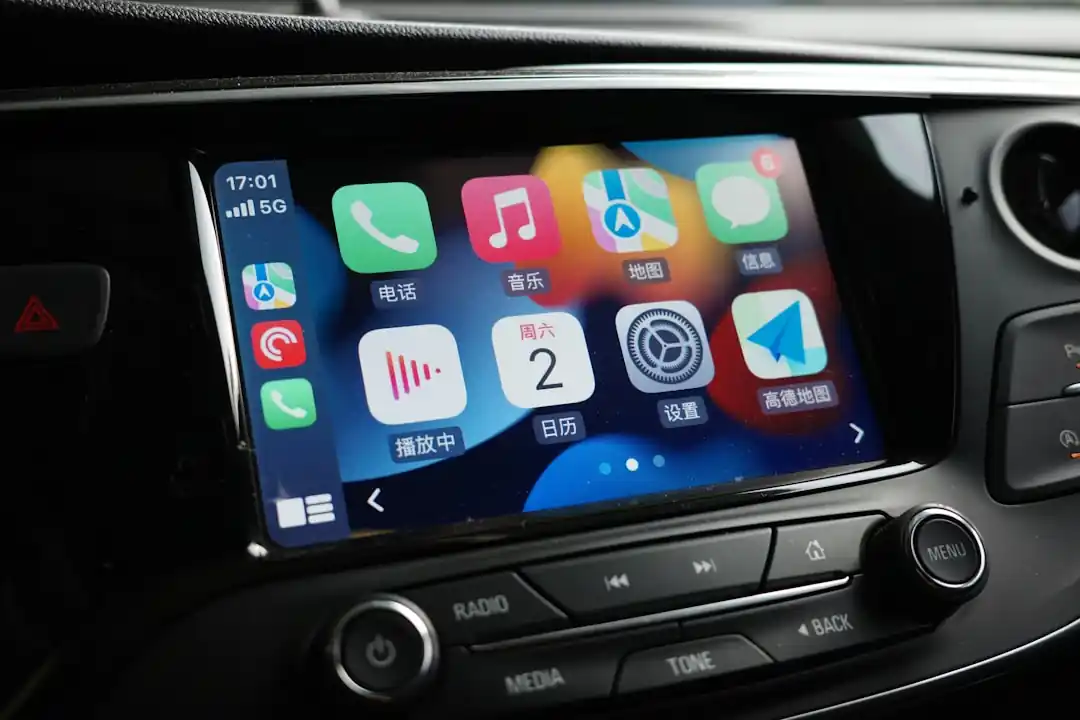
The most immediate difference you'll notice is the user interface. It’s the digital equivalent of stepping into two very different cars. Apple CarPlay has long been defined by its simple, icon-based grid, mirroring the home screen of an iPhone. It’s clean, instantly recognizable, and incredibly easy to navigate with a quick tap. The icons are large, the layout is static, and there’s a comforting predictability to it all. You always know where everything is. With recent updates, CarPlay also introduced a split-screen dashboard, allowing you to see your navigation, music, and upcoming appointments all on one screen, which was a huge step forward.
Android Auto, on the other hand, has historically been more dynamic and, some might say, a bit more chaotic. It was originally based on a card-like system reminiscent of the old Google Now, where information would pop up as it became relevant. However, with the major "Coolwalk" update, Google shifted to a more modern, adaptable split-screen layout. This new interface is fantastic because it can intelligently resize and rearrange itself to fit different screen sizes and orientations, which is a huge plus given the wild variety of car displays out there. It can show your map on one side with your music player and a notification card on the other, making it feel very information-dense and efficient.
Honestly, choosing between them on looks alone is purely subjective. Do you prefer Apple’s clean, walled-garden aesthetic where everything has its place? Or do you lean towards Google’s more flexible, information-forward approach that adapts to your needs?
The Brains of the Operation: Siri vs. Google Assistant
This is where the philosophical differences between Apple and Google really shine. Your primary way of interacting with these systems while driving is through your voice, and the digital assistants behind them are fundamentally different beasts.
In the CarPlay corner, you have Siri. Siri is excellent for tasks related to your iPhone's core functions. Sending a text via iMessage, making a call, playing a specific playlist from Apple Music, or getting directions to a contact's address are all handled smoothly and reliably. It’s deeply integrated into the Apple ecosystem. However, when it comes to general knowledge questions or more complex queries, Siri can sometimes fall short. It often requires you to phrase things in a specific way and can be a bit more rigid in its understanding.
Then you have Google Assistant in Android Auto, and frankly, it’s in a different league when it comes to intelligence. Leveraging Google's massive search index and AI capabilities, the Assistant is conversational, context-aware, and incredibly powerful. You can ask it almost anything you’d type into a Google search bar, from "How late is the nearest Target open?" to "What’s a good substitute for oregano?" and get a direct, accurate answer. It feels less like you're issuing commands and more like you're talking to a knowledgeable co-pilot. For anyone who relies heavily on voice commands for more than just basic phone functions, Google Assistant is the undisputed champion.
The App Ecosystem
Both platforms support the essentials that most people want in a car: navigation, music, podcasts, and messaging. You’ll find Spotify, Waze, Audible, and WhatsApp on both CarPlay and Android Auto. However, the app selection and how they’re managed differ slightly.
Apple maintains a very tight grip on the apps allowed on CarPlay, curating the selection heavily to ensure they meet strict driver-safety guidelines. This means the app library is smaller, but the quality and consistency of the user experience are generally very high. You’re unlikely to encounter a buggy or poorly designed app.
Google, while also prioritizing safety, is a bit more open. This has allowed for a slightly wider variety of apps to make their way onto the platform. The biggest difference, however, is in mapping. While both platforms support Google Maps, Apple Maps, and Waze, the experience can feel more native and integrated on their home turf. Apple Maps on CarPlay is beautifully designed and works seamlessly with your calendar and contacts. Meanwhile, Google Maps on Android Auto is packed with features and often feels a step ahead with real-time traffic data and routing.
Ultimately, unless you rely on a very specific, niche app that’s only available on one platform, you’ll likely be well-served by either. The core experience for the most popular apps is excellent on both.
The Final Verdict: It’s All About You
So, which one is better? After all this, the answer is still the one that works with your phone. And that’s okay. You can’t use CarPlay with an Android phone, and you can’t use Android Auto with an iPhone. The real takeaway is that both systems are fantastic and have matured into indispensable driving companions.
The choice really comes down to your personal preference in digital ecosystems. If you are deeply embedded in Apple's world—you love the clean design, the seamless integration of iMessage and Apple Music, and the simple, predictable nature of iOS—then CarPlay will feel like a perfect, natural extension of your digital life.
If you're an Android user who values customization, the unparalleled intelligence of Google Assistant, and a more open approach to apps and services, then Android Auto is tailor-made for you. It’s a powerhouse of information and flexibility. The best system is the one that makes your drive safer and less stressful, and on that front, both Apple and Google have delivered in a big way. Whichever side of the fence you're on, the future of the connected car is looking bright.

The 1970s Tech That's Still Phoning Home From Interstellar Space
The Digital Cockpit: Navigating the Best In-Car Infotainment Systems
Related Posts
 MOBILE
The Great Console Debate: How to Choose the Right Gaming System for Your Family
Feeling stuck between a Switch, a PlayStation, and an Xbox? Let's break down which gaming console is the perfect fit for your family's game nights.
 MOBILE
From Fragile to Formidable: The Surprising Evolution of Foldable Phone Durability
Remember when the idea of folding a smartphone screen in half felt like a disaster waiting to happen? Let's talk about how far they've come, because the story is pretty incredible.

Popular Posts

Rethinking Non-Profit Promotion: Creative Strategies That Actually Drive Event Impact

Beyond Stark White: The Best Interior Paint Colors to Light Up Your New Space

The Simple Pre-Workout Fueling Strategy That Saved My Long Runs